Minimizing the Cost of Context Switching: Time Management Strategies for Developers
Understand the cost of context switching in the software development industry, as well as common causes, examples and solutions for productivity.
 Amr AbdouAugust 4, 2023
Software developers usually find themselves switching contexts while working on their assigned tasks, leading to lost focus and increased stress levels. Context switching refers to shifting focus from one task to another, requiring an adjustment to a new set of requirements, skill sets, tools, documentation sources, and codebases.
A study conducted at the University of California, Irvine suggests that it can take more than twenty-three minutes on average to regain full focus after an interruption, leading to a critical decrease in productivity. While context switching can be inevitable, frequent switching leads to a reduction in a software developer's ability to deliver high-quality code on time.
This article introduces context switching examples, its main causes, and how it can negatively affect your productivity as a developer. You'll also explore ways and techniques to overcome the cost of context switching and learn about a new AI-powered tool that can promote seamless workflows and increase your productivity.
What is Context Switching?
The term context switching originates from computer science. It originally refers to the process where a computer saves the state or context of a process to allow multiple processes to share a single CPU. It has been repurposed as a general term to refer to the process by which developers switch their attention from one task to another.
Given the dynamic nature of a software development environment, developers frequently have to switch between various contexts - whether that be between the browser, IDE, collaboration software, or other tools in their day-to-day workflow. Developers also switch context while working on a single task by fixing bugs, working with multiple source code repositories, collaborating over various tools, writing new code, attending meetings, and responding to emails.
What Are the Main Causes of Context Switching for Developers?
The causes of context switching can be at the individual working style level, team management level, or organizational culture level. The following sections explore the most common examples of context switching in a software development environment.
Suboptimal DevOps Strategies
In the DevOps domain, context switching at work can occur due to a number of suboptimal strategies and practices:
- Unclear definition of roles and responsibilities: Members of a specific team may be frequently called upon to address tasks that aren't part of their responsibilities. For instance, developers may be asked to handle deployment or act as customer support in the absence of a dedicated customer support team. Frequently being on call leads to inefficiencies and delays.
- Slow workflows: Developers often search, copy, and save code snippets from resources like Stack Overflow and ChatGPT. However, the workflow of copying the code, saving it into note-taking apps or Google Docs, and later finding it can be messy and draw focus away from work.
- Collaborating across multiple tools: Using Microsoft Teams might involve sharing code snippets as screenshots or raw text after being copied from an IDE, leading to unnecessary extra work involving context switching overhead. A supporting integration, such as the Pieces Microsoft Teams App, might help in this case. With the Pieces for Microsoft Teams integration, developers can extract and enrich code directly from chat images by simply typing
@Pieces Extract. This level of automation promotes workflow efficiency and reduces context switching costs. - Lack of proper prioritization and planning: This often leads to context switching multitasking. If issues and tasks aren't correctly prioritized, developers end up juggling more than one task simultaneously.
Too Many Parallel Tasks Requiring Constant Multitasking
Besides the usual understanding of multitasking, which includes working on multiple tasks at the same time, developers are often required to perform a range of parallel subtasks within their workflow. When writing code, you might need to research code snippets in a browser, collaborate with team members on platforms like Microsoft Teams or Slack, manage version control, and perform testing and debugging.
Narrowing down the number of platforms used throughout your workflow and adopting an AI code generation tool like the Pieces Copilot can help minimize the cost of context switching and take the weight of many parallel tasks off your shoulders. This “tool in between tools” not only offers code completion capabilities directly in your IDE as well as in the desktop application, but also streamlines workflows through easy saving from the browser, enhanced collaboration in your collaborative environment, and deep integration of AI-enabled features throughout your existing tech stack.
Fragmented Schedules
A developer's work requires deep focus to understand complex problems, work on solutions, debug, and minimize errors. Frequent interruptions by meetings can disrupt this focus.
Switching from development work to a meeting requires a shift in a developer's mindset from problem-solving to communication, and vice versa. These frequent shifts can potentially decrease coding efficiency and compromise the quality of the written code.
Ad Hoc Requests and Interruptions
Ad hoc requests and interruptions harm productivity and workflow in any work environment. This effect is worsened in a software development environment, which typically requires deep concentration.
When a developer has to shift their focus to address an ad hoc request, there are cognitive costs involved. These costs rise when the ad hoc task fundamentally differs from the task at hand. Such constant interruptions can lead to increased levels of stress and contribute to burnout. Frequently responding to ad hoc requests can lead to increased delays, pushing back deadlines and potentially affecting whole project timelines.
Tool and Environment Switching
Constantly switching between tools and work environments is a common occurrence with significant consequences for overall productivity. Those switches can happen due to many factors, including:
- Contextual dependency: Projects that involve collaboration with multiple individuals or interconnected projects often require frequent context switching. Each interaction with a different person or project might incur a change in a tool or working environment, breaking the developer's focus on their core work.
- Personal working style: Your personal working style might involve an over-reliance on different tools or a lack of productivity tools—for instance, storing code snippets in multiple ways (such as with Google Docs, note-taking apps, and desktop files). This scattered approach may result in difficulties when attempting to locate specific snippets, and you might end up searching through your chaotic browser history or elsewhere online whenever you need to write a particular function. Pieces saves the origin website as metadata attached to all of your saved code snippets in the app, and even auto-generates related links to help further your project and get you back up to speed.
- Company culture: Constant notifications from various collaboration tools, emails, and project management systems can be distracting. Additionally, a company culture that promotes rapid adoption and switching between new technologies and tools can contribute to information overload, resulting in increased stress levels among developers.
- Combining multiple sources of information: Having to merge information from multiple sources into a single use case in your project wastes time and is stressful work. These sources could be websites, software documentation, internal systems, personal files, or collaboration tools.
Fear of Missing Out
The fear of missing out (FOMO) is a term used in social contexts that refers to the feeling that others are having more fun or experiencing better things that you are missing out on. This feeling isn't limited to social scenarios. Developers can also fall victim to this fear in their professional environments. With the abundance of team collaboration tools such as Slack, Microsoft Teams, Asana, Jira, or even team group chats, you can always be connected with your team.
While these tools have made collaboration and employee engagement easier, they can also be a reason for constant interruption, leading to frequent context switching productivity loss. This requires clearly establishing guidelines at the team level on when the developers can check company chat rooms and self-discipline from the developers themselves.
Never-Ending Additions of New Technologies
The rapid introduction of new technologies also leads to constant context switching in software development. The addition of new technologies includes releasing new versions of programming languages, frameworks, APIs, and even new features for project management software and collaboration tools.
In addition to the time cost of learning new technologies, there is an additional cost associated with shifting focus from the current task to updating deprecated functions and methods in older technologies. This updating process can lead to further context switches, impacting productivity.
Understanding the Cost of Context Switching
Each interruption or task switch affects the workflow, causing a loss in productivity as the developer has to refocus and rebuild their mental model of the problem. Based on the previously mentioned study, it takes over twenty minutes on average to regain full focus after an interruption, leading to a critical decrease in productivity. The loss of focus and constant context shifts lead to a waste of time, an increase in the time spent on a single task, cognitive overload, communication overhead, and a lower overall quality of the code delivered.
At the team level, if one team member is constantly disrupted or juggling multiple tasks, they can become a bottleneck, delaying the project's overall progress. Furthermore, if developers are continually asked to switch between different projects or tasks, it can become difficult for the team to maintain a clear and unified vision of their goals. This lack of focus can lead to errors, quality issues, and increased technical debt over time.
How to Reduce Context Switching
Context switching at work is inevitable in many cases. However, by applying productive techniques and wisely choosing the best developer productivity tools, you can reduce its negative effects and even boost your productivity.
Plan Your Schedule Better and Stick to It
While sticking to your schedule without interruptions might seem unattainable in a software development environment, strategically planning and managing your schedule can help you significantly enhance your efficiency and make the time you spend on each task more effective. The following are some key scheduling strategies and techniques that can help you overcome the impact of context switching.
Schedule Buffer Time
It's a common occurrence in the software development world to find your planned schedule disrupted by unexpected tasks, leading to a dip in productivity. The key is to include buffer time in your schedule.
Allocating buffer time is a common practice in project management that's used to deal with planning fallacy and optimism bias. When planning your schedule, make sure to include dedicated blocks of time left intentionally open for unanticipated occurrences.
You can make the most of your buffer times by utilizing them on days with fewer interruptions. During a smooth day with fewer unexpected tasks, you can use the buffer time for personal development, learning new skills, or working on future tasks ahead of time. This flexible approach can help you manage ad hoc requests, prevent context switching cost, and maintain a steady, productive rhythm in your work.
Do One Task at a Time
Multitasking might seem like a good technique to increase efficiency. In reality, juggling multiple tasks that require a high level of focus results in exhausting your cognitive resources and reducing your overall productivity. Multitasking might work with a routine involving repetitive tasks that don't require deep focus, but in the software development world, it has the opposite effect.
When you dedicate your attention to a single task, it helps you achieve deeper understanding and focus, which can enhance your ability to absorb new concepts that you might have to learn to finish the task at hand. As a result, you should update your schedule to avoid multitasking while also keeping enough buffer time between tasks.
Remember that sticking to your single-tasking schedule should not compromise your flexibility. If a task takes more time than initially planned or is put on hold, update your schedule accordingly. To avoid multitasking and thus context switching productivity, shift tasks based on new time estimates and changed priorities.
Take the Right Amount of Breaks between Tasks
Continuous work without breaks doesn't result in high productivity. The right balance of deep, focused work and deliberate breaks helps maintain sustained productivity. One solution that can help organize and develop a healthy balance between focused, productive times and short breaks in between is the Pomodoro Technique.
While working on one task, long breaks lead to a disrupted workflow, and too few or excessively short breaks can push you toward burnout. On the other hand, when you switch between different tasks, especially if they require different skill sets and include using various tools, make sure you have a long enough break. For instance, using the Pomodoro Technique, you can set every focus cycle to 25 minutes of work at a time, separated by 5-minute breaks, and take a longer break before switching to another task.
It's important to remember that what works for someone else may not work for you. Give yourself time to experiment with different patterns, find what brings the best results, and incorporate it into your schedule.
Choose Better Dev Tools for Productivity
Choosing the right productivity tool can help you streamline your work, speed up the coding process, and improve your ability to manage code snippets efficiently. If you find yourself constantly switching between different tools to search for code snippets or spending time trying to understand the functions of code snippets that you wrote a while ago, it might be time to consider a more comprehensive solution like Pieces.
This section demonstrates some of the ways you can boost your efficiency and minimize context switching using Pieces.
Organize Frequently Used Code Snippets and Solutions for Easy Access
When you save a snippet with Pieces, you’ll automatically classify the language, categorize it with tags, and enrich the code with titles, descriptions, related links and more–so you can easily find it in the future. This categorization saves you time searching for snippets, since you can search for them in Pieces based on natural language, code, tags and more, without ever leaving the IDE (if you download the IDE integration as well as the desktop application).
The following image shows the Pieces list view interface, with the code snippets categorized in the left sidebar and the selected snippet shown in the main panel:

Reduce Multitasking While Writing Code
To reduce the number of tasks done while writing code, Pieces automatically enriches your snippets with context and metadata. This automation will help you spend less time saving and organizing code snippets, and you'll be able to understand the function of the saved code snippet without having to dig through the code itself.
For instance, when you save a code snippet, Pieces will automatically suggest relevant tags, links, and descriptions based on the snippet. This metadata not only helps when you're searching for a specific snippet but also makes the code easily understandable to other developers who might use it.
The following example shows how Pieces adds a JavaScript snippet to get the day of the year from a Date object. Once the code is pasted, Pieces automatically creates search terms, labels, descriptions, and related links:

With Pieces’ IDE plugins, you can not only access your personal repository of code snippets right in the IDE, but you’ll also get access to the blazing-fast Global Search feature, as well as the Pieces Copilot to write code–similar to GitHub Copilot, ChatGPT and Tabnine.
Discover Code Snippets
Besides saving snippets, Pieces also helps you discover new and useful code snippets. While searching for a code snippet, it can suggest snippets based on the ones you frequently use or your current project's context:

You can also use Pieces to discover snippets from a file, a folder, or GitHub gists. To discover new snippets from these sources, you can click Add Snippets in the lower left corner, then click Snippet Discovery to see all the discovery options. From the Snippet Discovery list, you can click Select a folder to add snippets from a project folder:

Pieces will then go through all the files in this folder and extract code snippets from them.
Generate and Transform Code from One Language to Another Quickly
Writing code that does the same function in multiple programming languages is time-consuming. The Pieces code transformation feature can help you save time, minimize context switching overhead, and reduce the learning curve of a new language.
Transforming code is a very simple process using Pieces; you can even do it without needing to log in. First, add a code snippet by clicking the Add Snippets button or select a previously saved snippet from the left sidebar. Then, open the edit view by pressing Ctrl+E on Windows/Linux or Command+E on Mac, and click Transform or Translate Snippet with a Description from the right-side menu.
In the following example, you can see how easy it is to convert the JavaScript function used above into Python, saving you valuable time:
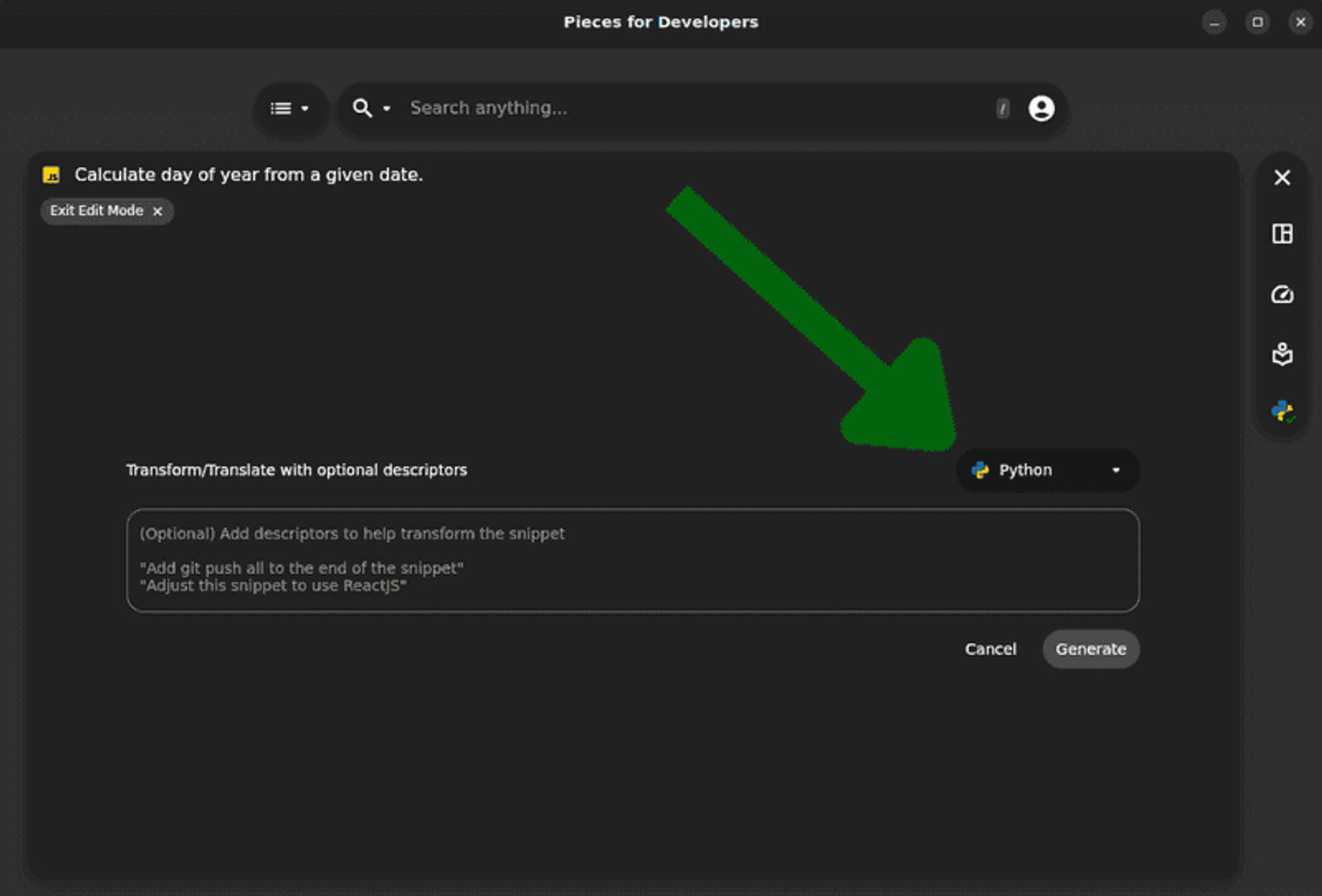
And the result includes comments to help you understand the code:

Transform Code Snippets into Boilerplate Templates
If you often use the same patterns or structures of code in your projects, you can save these as templates in Pieces. Templates make it easy for developers to get started with frequently used code snippets in their projects.
To create a boilerplate template, you simply open the edit view, then click Modify Snippet for Boilerplate Template:

Share Snippets with Teammates
You can create shareable links from Pieces to improve collaboration and knowledge sharing within your team. Sharing snippets with teammates using Pieces enrichment is a more productive alternative to manually sending code snippets or uploading them to a collaboration tool or a team chat. You can do this by clicking the Generate Shareable Link icon on the right:

The following is an example of a shared code snippet:

You can also access the snippet using this shareable link.
This link is customizable, so go ahead and claim your unique Pieces domain today!
Conclusion
Context switching in a fast software development environment is a major source of errors, low-quality code, wasted time, and overall project delays. As Elon Musk recently said in an interview with WSJ, “Fear is not the mind killer, context switching is”.
In this article, you explored context switching, its major triggers, and its negative impact on a developer's productivity. The strategies and techniques presented were designed to help manage and overcome the negative effects caused by frequent context shifts. You also learned how to utilize Pieces as an AI-powered "tool between tools" and a game-changing solution to create seamless workflows, save time, and minimize the costs of context switching.
Pieces is an intelligent code snippet manager. With its on-device machine learning, it adds titles, descriptions, tags, related links, and other context for streamlined organization and ultra-fast accessibility in your developer tools. In addition, it can help you automatically discover snippets, transform code into other languages, create boilerplate templates, and more.
You can install Pieces and start streamlining your workflow. It is available as a desktop app on Windows, macOS, and Linux; as a browser plugin on Chrome, Edge and Brave; as an extension for VS Code, JetBrains, Microsoft Teams, and JupyterLab, and more. Explore integrations with your favorite tools here (keep in mind, the desktop app is required for full functionality of the integrations).